
The neuromaps project provides standardized brain maps from published studies — PET receptor densities, gene expression gradients, cortical thickness, and hundreds of other measures. These brain maps are continuous: each vertex on the cortical surface has a floating-point value rather than a parcel label.
create_cortical_from_neuromaps() turns any neuromaps annotation into a ggseg atlas by discretizing the continuous values into quantile bins, each becoming a plottable region. This tutorial walks through the full workflow, from fetching an annotation to fine-tuning the binning.
What you need
- The neuromapr R package (for fetching neuromaps annotations)
- For surface annotations (GIFTI): no system tools needed
- For volume annotations (NIfTI): FreeSurfer installed with
fsaverage5(usesmri_vol2surfto project the volume onto the cortical surface)
Fetching a neuromaps annotation
The source and desc arguments identify the brain map in the neuromaps registry. For this tutorial we use the first principal component of gene expression from the Allen Human Brain Atlas, provided by abagen.
atlas_auto <- create_cortical_from_neuromaps(
  source = "abagen",
  desc = "genepc1",
  atlas_name = "abagen_genepc1"
)
#> Warning: Atlas has 91189 vertices, against a budget of 32000 for 32 cortical region.
#> ℹ A large atlas is slow to plot and makes the package that ships it bigger.
#> ℹ `atlas_polish(atlas)` simplifies and smooths it in one step.

atlas_auto
#>
#> ── abagen_genepc1 ggseg atlas ──────────────────────────────────────────────────
#> Type: cortical
#> Regions: 16
#> Hemispheres: left, right
#> Views: inferior, lateral, medial, superior
#> Palette: ✔
#> Rendering: ✔ ggseg
#> ✔ ggseg3d (vertices)
#> ────────────────────────────────────────────────────────────────────────────────
#>    hemi region     label
#> 1  left  bin_1  lh_bin_1
#> 2  left  bin_2  lh_bin_2
#> 3  left  bin_3  lh_bin_3
#> 4  left  bin_4  lh_bin_4
#> 5  left  bin_5  lh_bin_5
#> 6  left  bin_6  lh_bin_6
#> 7  left  bin_7  lh_bin_7
#> 8  left  bin_8  lh_bin_8
#> 9  left  bin_9  lh_bin_9
#> 10 left bin_10 lh_bin_10
#> ... with 22 more rows
The pipeline reads the annotation, bins the values, and projects the mesh to 2D polygons — all in seconds.
The regions listed are the quantile bins the pipeline created automatically. Each bin corresponds to a range of gene expression values and covers roughly the same number of vertices.
How binning works
Neuromaps annotations are continuous — every vertex has a value like 0.42 or −1.73 rather than a label like “precuneus.” To turn these into plottable atlas regions, the pipeline discretizes the values into bins. Each bin becomes a region colored along a spectral gradient from low to high values.
Auto-detection: parcellation vs. continuous
When the pipeline reads the annotation data, it first checks whether the vertex values are integers or floating-point:
- Integer values → treated as a parcellation. Each unique ID becomes a region. Value 0 is the medial wall. No binning.
- Floating-point values → treated as a continuous brain map. NaN vertices are the medial wall. Remaining values are binned.
This detection is automatic. If you have a parcellation map from neuromaps (like Schaefer parcels), the pipeline will handle it as discrete regions without binning.
The breaks argument
breaks controls how continuous data is cut into bins. Both hemispheres are cut on the same bin edges, so a bin covers the same range of values on the left and on the right.
NULL (the default) makes quantile bins and uses Sturges’ rule to choose how many. The formula is 1 + log2(n), rounded up, where n is the number of valid (non-NaN) vertices across both hemispheres, clamped to the range 5–20. For fsaverage5 with 10,242 vertices per hemisphere, this gives about 16 bins.
nrow(atlas_auto$core)
#> [1] 32
atlas_auto$core |> filter(region != "unknown") |> distinct(region)
#> # A tibble: 16 × 1
#>    region
#>    <chr>
#>  1 bin_1
#>  2 bin_2
#>  3 bin_3
#>  4 bin_4
#>  5 bin_5
#>  6 bin_6
#>  7 bin_7
#>  8 bin_8
#>  9 bin_9
#> 10 bin_10
#> 11 bin_11
#> 12 bin_12
#> 13 bin_13
#> 14 bin_14
#> 15 bin_15
#> 16 bin_16
A single number asks for that many quantile bins. Use fewer bins for a cleaner, more schematic look; more bins for finer spatial resolution.
atlas_5 <- create_cortical_from_neuromaps(
  source = "abagen",
  desc = "genepc1",
  breaks = 5,
  atlas_name = "abagen_5bin"
)
#> Warning: Atlas has 29333 vertices, against a budget of 10000 for 10 cortical region.
#> ℹ A large atlas is slow to plot and makes the package that ships it bigger.
#> ℹ `atlas_polish(atlas)` simplifies and smooths it in one step.

atlas_5$core |> filter(region != "unknown") |> distinct(region)
#> # A tibble: 5 × 1
#>   region
#>   <chr>
#> 1 bin_1
#> 2 bin_2
#> 3 bin_3
#> 4 bin_4
#> 5 bin_5
atlas_20 <- create_cortical_from_neuromaps(
  source = "abagen",
  desc = "genepc1",
  breaks = 20,
  atlas_name = "abagen_20bin"
)
#> Warning: Atlas has 112946 vertices, against a budget of 40000 for 40 cortical region.
#> ℹ A large atlas is slow to plot and makes the package that ships it bigger.
#> ℹ `atlas_polish(atlas)` simplifies and smooths it in one step.

atlas_20$core |> filter(region != "unknown") |> distinct(region)
#> # A tibble: 20 × 1
#>    region
#>    <chr>
#>  1 bin_1
#>  2 bin_2
#>  3 bin_3
#>  4 bin_4
#>  5 bin_5
#>  6 bin_6
#>  7 bin_7
#>  8 bin_8
#>  9 bin_9
#> 10 bin_10
#> 11 bin_11
#> 12 bin_12
#> 13 bin_13
#> 14 bin_14
#> 15 bin_15
#> 16 bin_16
#> 17 bin_17
#> 18 bin_18
#> 19 bin_19
#> 20 bin_20
Quantile-based breaks
Unless you supply the edges yourself, bins are created using quantile breaks, not equal-width intervals. This means each bin contains approximately the same number of vertices.
Equal-width bins would leave most vertices in a few central bins when the distribution is skewed, which is common for brain maps. Quantile binning ensures every bin contributes visible surface area to the atlas, making the resulting plot informative regardless of the data distribution.
Color palette
Bins are colored using the HCL Spectral palette. Bin 1 (lowest values) gets the cool end of the spectrum, and the last bin (highest values) gets the warm end. The medial wall is always grey (#BEBEBE) and labeled “unknown.”
atlas_auto$palette
#>  lh_bin_1  lh_bin_2  lh_bin_3  lh_bin_4  lh_bin_5  lh_bin_6  lh_bin_7  lh_bin_8
#> "#A71B4B" "#C53E41" "#E15D1C" "#ED820A" "#F5A433" "#F9C25C" "#FCDE85" "#FEF5AD"
#>  lh_bin_9 lh_bin_10 lh_bin_11 lh_bin_12 lh_bin_13 lh_bin_14 lh_bin_15 lh_bin_16
#> "#EAFAB7" "#BAEEAE" "#81DEAD" "#3BC9B2" "#00B1B5" "#0094B5" "#2873AE" "#584B9F"
#>  rh_bin_1  rh_bin_2  rh_bin_3  rh_bin_4  rh_bin_5  rh_bin_6  rh_bin_7  rh_bin_8
#> "#A71B4B" "#C53E41" "#E15D1C" "#ED820A" "#F5A433" "#F9C25C" "#FCDE85" "#FEF5AD"
#>  rh_bin_9 rh_bin_10 rh_bin_11 rh_bin_12 rh_bin_13 rh_bin_14 rh_bin_15 rh_bin_16
#> "#EAFAB7" "#BAEEAE" "#81DEAD" "#3BC9B2" "#00B1B5" "#0094B5" "#2873AE" "#584B9F"
Visualizing the effect of bin count
Comparing the 3D rendering across different bin counts makes it easy to choose the right level of detail:
ggseg3d::ggseg3d(atlas = atlas_5, hemisphere = "left")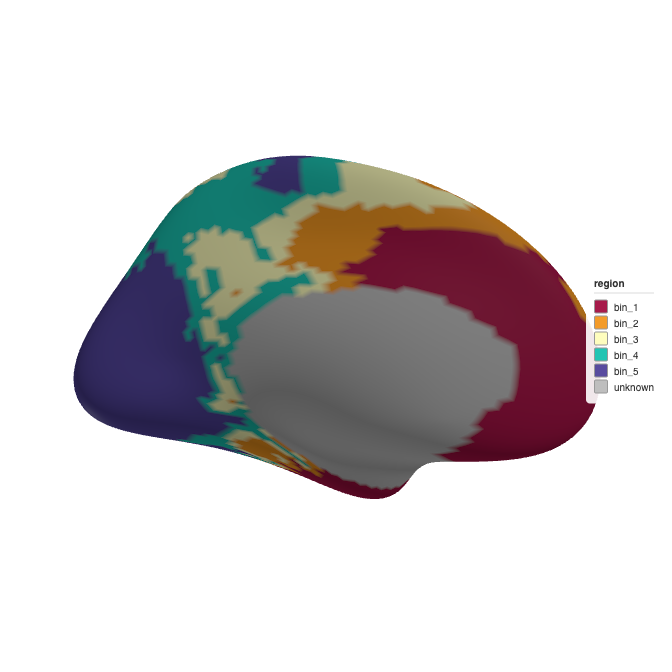
3D brain rendering with 5 quantile bins.
ggseg3d::ggseg3d(atlas = atlas_auto, hemisphere = "left")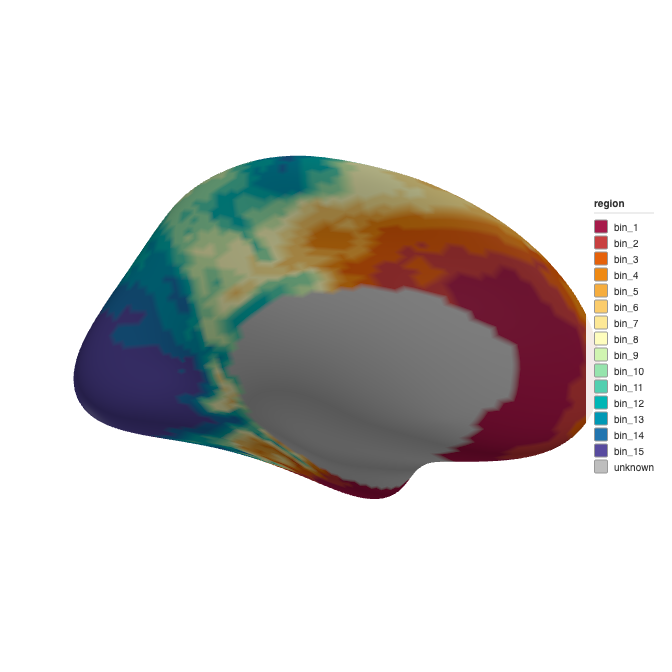
3D brain rendering with auto-detected bins (Sturges’ rule).
ggseg3d::ggseg3d(atlas = atlas_20, hemisphere = "left")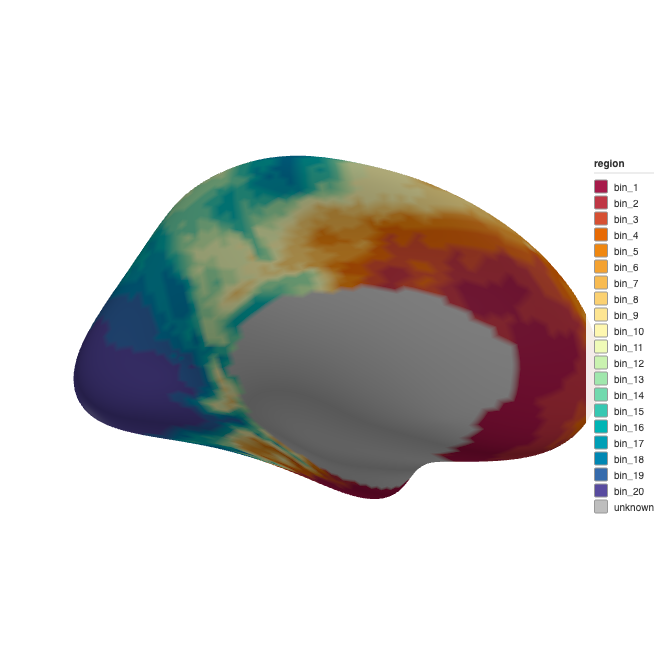
3D brain rendering with 20 quantile bins.
Tuning simplification
The pipeline returns raw polygons; call atlas_simplify() and atlas_smooth() afterwards to balance clarity and file size. We start with 7 bins and then simplify to roughly 20% of vertices:
atlas_full <- create_cortical_from_neuromaps(
  source = "abagen",
  desc = "genepc1",
  breaks = 7,
  atlas_name = "abagen_genepc1",
  verbose = TRUE
)
#> ℹ Fetching neuromaps: source="abagen", desc="genepc1"
#> ℹ Using cached 'source-abagen_desc-genepc1_space-fsaverage_den-10k_hemi-L_feature.func.gii'
#> ℹ Using cached 'source-abagen_desc-genepc1_space-fsaverage_den-10k_hemi-R_feature.func.gii'
#>
#> ── Creating brain atlas "abagen_genepc1" from neuromaps ────────────────────────
#> ℹ Input files: '~/Library/Caches/org.R-project.R/R/neuromapr/annotations/abagen/genepc1/fsaverage//source-abagen_desc-genepc1_space-fsaverage_den-10k_hemi-L_feature.func.gii' and '~/Library/Caches/org.R-project.R/R/neuromapr/annotations/abagen/genepc1/fsaverage//source-abagen_desc-genepc1_space-fsaverage_den-10k_hemi-R_feature.func.gii'
#> ℹ Reading neuromaps annotation
#> ✔ Reading neuromaps annotation [155ms]
#>
#> ℹ Projecting mesh to 2D polygons
#> ℹ Projecting "rh" "lateral"
#> ℹ Projecting mesh to 2D polygons
ℹ Projecting "rh" "medial"
#> ℹ Projecting mesh to 2D polygons
ℹ Projecting "rh" "superior"
#> ℹ Projecting mesh to 2D polygons
ℹ Projecting "rh" "inferior"
#> ℹ Projecting mesh to 2D polygons
ℹ Projecting "lh" "lateral"
#> ℹ Projecting mesh to 2D polygons
ℹ Projecting "lh" "medial"
#> ℹ Projecting mesh to 2D polygons
ℹ Projecting "lh" "superior"
#> ℹ Projecting mesh to 2D polygons
ℹ Projecting "lh" "inferior"
#> ℹ Projecting mesh to 2D polygons
✔ Projecting mesh to 2D polygons [17.5s]
#>
#> ✔ Temporary files removed
#> ✔ Brain atlas created with 14 regions
#> ℹ Pipeline completed [17.9s]
#> Warning: Atlas has 44167 vertices, against a budget of 14000 for 14 cortical region.
#> ℹ A large atlas is slow to plot and makes the package that ships it bigger.
#> ℹ `atlas_polish(atlas)` simplifies and smooths it in one step.

atlas_full <- atlas_full |>
  atlas_simplify(keep = 0.2, exclude = context_pattern) |>
  atlas_smooth(exclude = context_pattern)
Post-processing
The “unknown” region (medial wall) renders as a filled region by default. Convert it to a background outline with atlas_region_contextual():
atlas_clean <- atlas_full |>
  atlas_region_contextual("unknown", match_on = "label")
#> Warning in atlas_region_contextual(atlas_full, "unknown", match_on = "label"): No regions matched "unknown".
#> ℹ No region was made contextual.
Rendering the final atlas
plot() is a base-graphics overview: one call, every view, no legend and nothing to configure. It is for looking at an atlas while you build it.
plot(atlas_clean)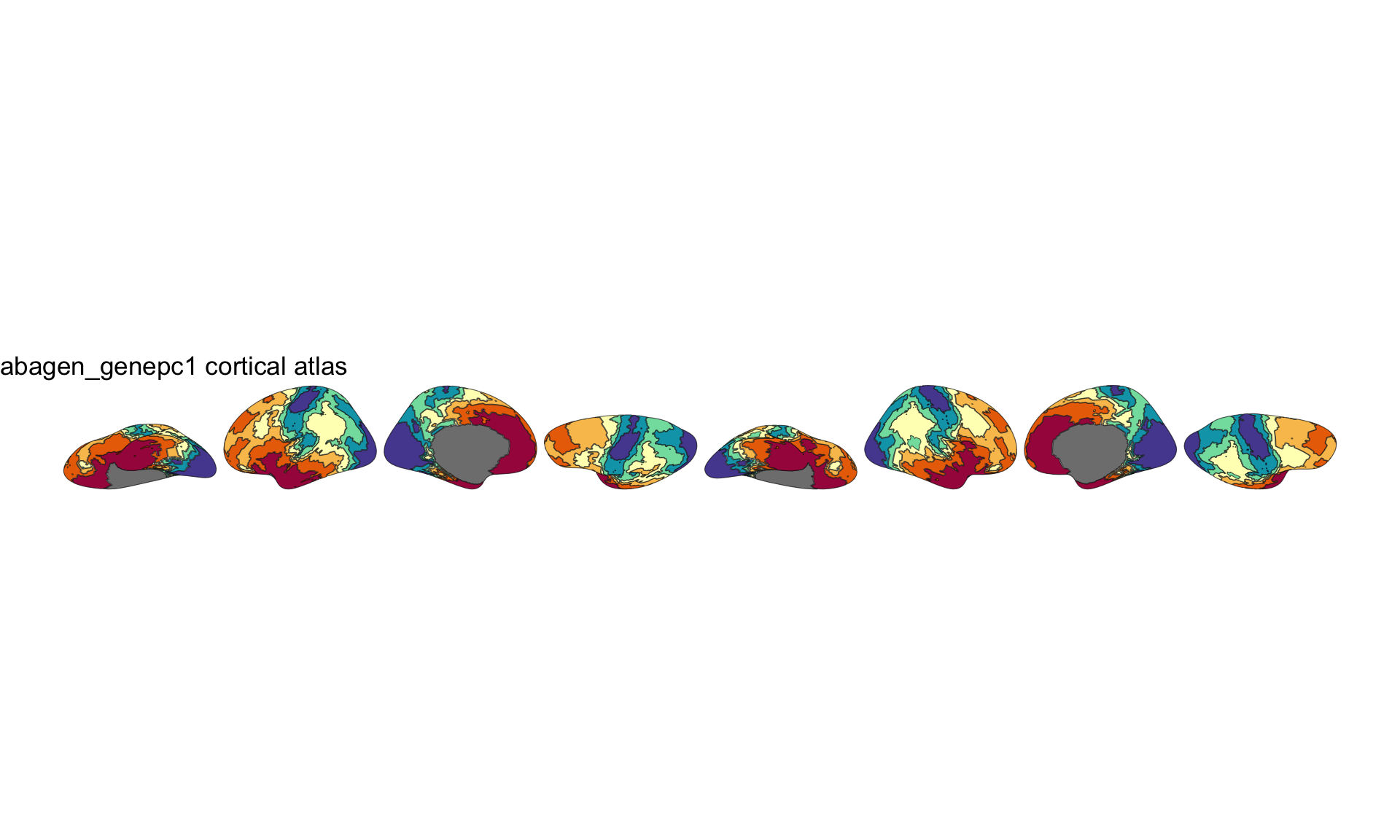
2D gene expression atlas, drawn by the base-graphics overview.
For a figure you intend to publish, reach for the ggplot2 layer in ggseg instead — ggplot() + geom_brain(atlas = atlas_clean) — where legends, scales and themes are yours to control in the usual way.
ggseg3d::ggseg3d(atlas = atlas_clean, hemisphere = "left")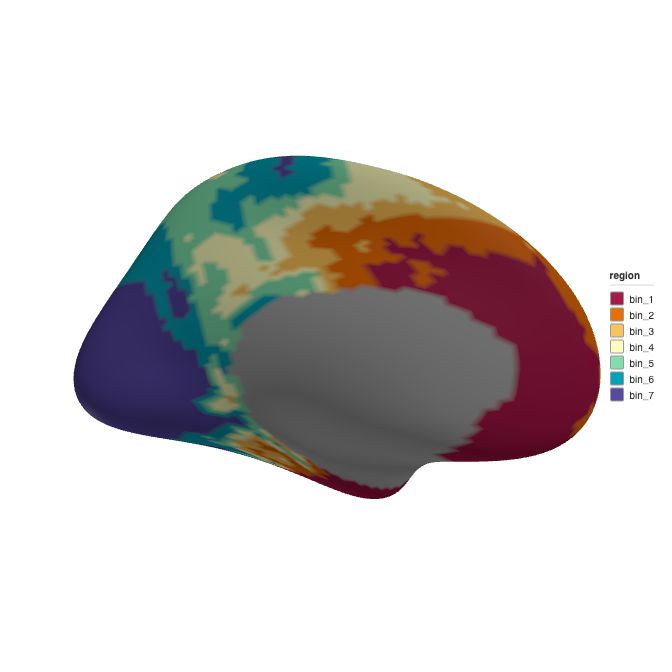
3D rendering of the final gene expression atlas.
Working with parcellation maps
Not all neuromaps annotations are continuous. Some contain integer vertex labels where each value maps to a brain region. The pipeline detects this automatically and skips binning entirely.
For parcellations, you can provide a label_table to map the numeric IDs to human-readable region names and custom colors. The registry currently ships only continuous maps, so the call below is shown rather than run — substitute a parcellation annotation when one is available:
labels <- data.frame(
  id = c(1, 2, 3),
  region = c("visual", "somatomotor", "dorsal_attention"),
  colour = c("#781286", "#4682B4", "#00760E")
)

atlas <- create_cortical_from_neuromaps(
  source = "schaefer",
  desc = "400Parcels7Networks",
  label_table = labels
)
Parcels not listed in label_table are auto-named as parcel_1, parcel_2, etc. and assigned colors from the Set2 palette.
Volume annotations
Some neuromaps annotations are volumetric NIfTI files in MNI152 space rather than surface GIFTI files. The pipeline detects this from the file extension (.nii or .nii.gz) and projects the volume onto the fsaverage5 surface using FreeSurfer’s mri_vol2surf.
atlas_vol <- create_cortical_from_neuromaps(
  source = "pet",
  desc = "5HT1a",
  atlas_name = "serotonin_5ht1a",
  breaks = 10
)
The volume-to-surface projection samples across cortical depth (0% to 100% in 10% steps) and takes the maximum value at each vertex, giving robust coverage even for thin cortical signals. FreeSurfer is always required for volume annotations.
Reading annotation files directly
If you already have GIFTI files on disk — from neuromaps, Connectome Workbench, or another source — you can bypass the fetching step and read them directly with read_neuromaps_annotation():
files <- neuromapr::fetch_neuromaps_annotation(
  source = "abagen",
  desc = "genepc1",
  space = "fsaverage",
  density = "10k",
  verbose = FALSE
)

annot_data <- read_neuromaps_annotation(files, breaks = 7)
annot_data
#> # A tibble: 16 × 5
#>    hemi  region  label      colour  vertices
#>    <chr> <chr>   <chr>      <chr>   <list>
#>  1 left  bin_1   lh_bin_1   #A71B4B <int [1,261]>
#>  2 left  bin_2   lh_bin_2   #E96F02 <int [1,318]>
#>  3 left  bin_3   lh_bin_3   #F9C25C <int [1,288]>
#>  4 left  bin_4   lh_bin_4   #FEFDBE <int [1,293]>
#>  5 left  bin_5   lh_bin_5   #81DEAD <int [1,337]>
#>  6 left  bin_6   lh_bin_6   #00A3B6 <int [1,299]>
#>  7 left  bin_7   lh_bin_7   #584B9F <int [1,408]>
#>  8 left  unknown lh_unknown #BEBEBE <int [1,038]>
#>  9 right bin_1   rh_bin_1   #A71B4B <int [1,372]>
#> 10 right bin_2   rh_bin_2   #E96F02 <int [1,314]>
#> 11 right bin_3   rh_bin_3   #F9C25C <int [1,344]>
#> 12 right bin_4   rh_bin_4   #FEFDBE <int [1,339]>
#> 13 right bin_5   rh_bin_5   #81DEAD <int [1,295]>
#> 14 right bin_6   rh_bin_6   #00A3B6 <int [1,333]>
#> 15 right bin_7   rh_bin_7   #584B9F <int [1,225]>
#> 16 right unknown rh_unknown #BEBEBE <int [1,020]>
For volume files in MNI152 space, use read_neuromaps_volume() instead.
Choosing the right number of bins
| breaks | Use case |
|---|---|
| 3–5 | High-level overview, schematic figures, publication thumbnails |
| 7–10 | Balanced detail, good for most visualizations |
| ~16 (auto) | Default; maximum spatial detail from Sturges’ rule |
| 15–20 | Dense gradients where fine differences matter |
More bins means more regions and larger atlas objects. The pipeline is fast regardless of bin count, so experiment freely.
Choosing the bin edges yourself
Quantile bins are not the only option. Give breaks the edges of the bins as increasing numbers, or a function that takes the map’s values and returns the edges:
# Fixed edges, for example to share one scale across several maps
create_cortical_from_neuromaps(
  source = "abagen",
  desc = "genepc1",
  breaks = c(-3, -1, 0, 1, 3)
)

# Round, equal-width bins
create_cortical_from_neuromaps(
  source = "abagen",
  desc = "genepc1",
  breaks = function(x) pretty(x, 6)
)
Vertices whose value falls outside the edges you give are left in unknown, and the pipeline warns about how many.
Saving
Once you’re happy with the atlas, save it as package data:
usethis::use_data(abagen_genepc1, overwrite = TRUE, compress = "xz")The compress = "xz" flag gives the best compression for sf geometry data.